Browser Automation with CaptchaSonic

๐Ÿค– Browser Automation with CaptchaSonic

Integrate CaptchaSonic into your automation frameworks for hands-free CAPTCHA solving at scale.

โฑ๏ธ Time to Complete: 10-15 minutes
๐Ÿ› ๏ธ Frameworks: Selenium, Playwright, Puppeteer
๐Ÿ’ป Languages: Python, JavaScript, Java, C#


๐ŸŽฏ What You'll Learn

By the end of this guide, you'll know how to:

  • โœ… Install and configure the extension for automation
  • โœ… Integrate with Selenium, Playwright, and Puppeteer
  • โœ… Handle headless mode limitations
  • โœ… Optimize for production environments

๐Ÿš€ Why Use the Extension for Automation?

ApproachBest ForProsCons
๐Ÿงฉ Browser ExtensionReal browser automationโ€ข No code changes needed. Works with any framework. Handles complex CAPTCHAsโ€ข Requires visible browser
๐Ÿ“ก Direct APIHeadless scrapingโ€ข True headless mode. Maximum control. Better for CLIโ€ข Requires code integration

[!TIP] Best of Both Worlds: Use the extension for development/testing and switch to the API for production deployments.


๐Ÿ“‹ Prerequisites

Before you begin, ensure you have:


๐Ÿ”ง Setup Process

Step 1: Download & Configure Extension

1.1 Download Source

# Clone the repository
git clone https://github.com/CaptchaSonic/Chrome-Extension.git
cd Chrome-Extension

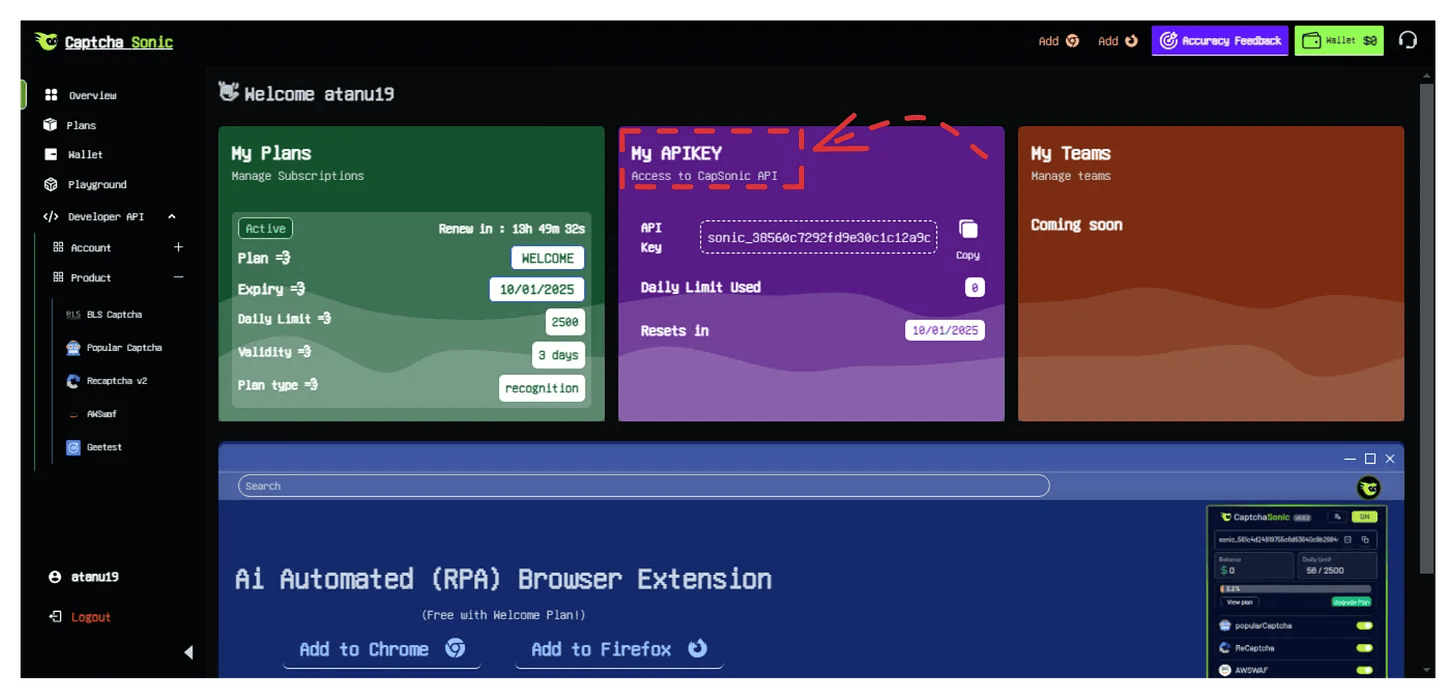
1.2 Configure API Key

Before loading the extension in automation, embed your API key:

// config/config.json
{
  "apiKey": "YOUR_API_KEY_HERE",
  "autoSolve": true,
  "solveDelay": 1000,
  "enabledCaptchas": {
    "recaptchaV2": true,
    "recaptchaV3": true,
    "hcaptcha": true,
    "geetest": true,
    "turnstile": true
  }
}

[!IMPORTANT] Security Note: Never commit your API key to version control. Use environment variables or config files outside your repository.

CaptchaSonic Dashboard - API Key


๐Ÿ Selenium Integration

Selenium is the most popular browser automation framework. Here's how to integrate CaptchaSonic:

Python

from selenium import webdriver
from selenium.webdriver.chrome.options import Options
from selenium.webdriver.common.by import By
from selenium.webdriver.support.ui import WebDriverWait
from selenium.webdriver.support import expected_conditions as EC
import os

# Path to your configured extension
EXTENSION_PATH = os.path.abspath("./CaptchaSonic-Extension")

def create_driver():
    """Create Chrome driver with CaptchaSonic extension"""
    chrome_options = Options()

    # Load the extension
    chrome_options.add_argument(f"--load-extension={EXTENSION_PATH}")

    # Optional: Disable automation detection
    chrome_options.add_experimental_option("excludeSwitches", ["enable-automation"])
    chrome_options.add_experimental_option('useAutomationExtension', False)

    # Optional: Add user agent
    chrome_options.add_argument("--user-agent=Mozilla/5.0 (Windows NT 10.0; Win64; x64) AppleWebKit/537.36")

    driver = webdriver.Chrome(options=chrome_options)
    return driver

def main():
    driver = create_driver()

    try:
        # Navigate to target site
        driver.get("https://www.google.com/recaptcha/api2/demo")

        # Extension automatically solves the CAPTCHA
        # Wait for the solution to be inserted
        WebDriverWait(driver, 60).until(
            EC.presence_of_element_located((By.ID, "recaptcha-demo-submit"))
        )

        # Click submit button
        driver.find_element(By.ID, "recaptcha-demo-submit").click()

        print("โœ… CAPTCHA solved and form submitted!")

    finally:
        driver.quit()

if __name__ == "__main__":
    main()

Java

import org.openqa.selenium.WebDriver;
import org.openqa.selenium.chrome.ChromeDriver;
import org.openqa.selenium.chrome.ChromeOptions;

public class CaptchaSonicExample {
    public static void main(String[] args) {
        // Path to extension
        String extensionPath = "/absolute/path/to/CaptchaSonic-Extension";

        // Configure Chrome options
        ChromeOptions options = new ChromeOptions();
        options.addArguments("--load-extension=" + extensionPath);
        options.addArguments("--disable-blink-features=AutomationControlled");

        // Create driver
        WebDriver driver = new ChromeDriver(options);

        try {
            // Navigate to target
            driver.get("https://www.google.com/recaptcha/api2/demo");

            // Extension automatically solves CAPTCHA
            Thread.sleep(10000); // Wait for solving

            // Continue automation...

        } catch (Exception e) {
            e.printStackTrace();
        } finally {
            driver.quit();
        }
    }
}

๐ŸŽญ Playwright Integration

Playwright offers better modern browser support. Here's the integration:

Node.js

const { chromium } = require('playwright');
const path = require('path');

async function main() {
  // Extension and user data paths
  const extensionPath = path.join(__dirname, 'CaptchaSonic-Extension');
  const userDataDir = '/tmp/playwright-user-data';

  // Launch browser with extension
  const context = await chromium.launchPersistentContext(userDataDir, {
    headless: false, // Extensions require visible browser
    args: [
      `--disable-extensions-except=${extensionPath}`,
      `--load-extension=${extensionPath}`,
      '--no-sandbox',
    ],
    viewport: { width: 1920, height: 1080 },
  });

  // Create new page
  const page = await context.newPage();

  try {
    // Navigate to target
    await page.goto('https://www.google.com/recaptcha/api2/demo');

    // Extension solves automatically
    // Wait for CAPTCHA solution
    await page.waitForTimeout(10000);

    // Click submit
    await page.click('#recaptcha-demo-submit');

    console.log('โœ… CAPTCHA solved!');
  } catch (error) {
    console.error('Error:', error);
  } finally {
    await context.close();
  }
}

main();

TypeScript

import { chromium, BrowserContext } from 'playwright';
import path from 'path';

async function createBrowserWithExtension(): Promise<BrowserContext> {
  const extensionPath = path.resolve(__dirname, '../CaptchaSonic-Extension');
  const userDataDir = '/tmp/playwright-user-data';

  return await chromium.launchPersistentContext(userDataDir, {
    headless: false,
    args: [
      `--disable-extensions-except=${extensionPath}`,
      `--load-extension=${extensionPath}`,
    ],
  });
}

async function solveCaptchaExample(): Promise<void> {
  const context = await createBrowserWithExtension();
  const page = await context.newPage();

  await page.goto('https://example.com/with-captcha');

  // Extension handles CAPTCHA automatically
  await page.waitForSelector('.success-message', { timeout: 60000 });

  await context.close();
}

solveCaptchaExample();

๐ŸŽช Puppeteer Integration

Puppeteer is great for Chrome/Chromium automation.

Node.js

const puppeteer = require('puppeteer');
const path = require('path');

const extensionPath = path.resolve(__dirname, './CaptchaSonic-Extension');

(async () => {
  // Launch browser with extension
  const browser = await puppeteer.launch({
    headless: false, // Extensions don't work in headless
    args: [
      `--disable-extensions-except=${extensionPath}`,
      `--load-extension=${extensionPath}`,
      '--no-sandbox',
      '--disable-setuid-sandbox',
    ],
    defaultViewport: null,
  });

  const page = await browser.newPage();

  try {
    // Navigate to target
    await page.goto('https://www.google.com/recaptcha/api2/demo', {
      waitUntil: 'networkidle2',
    });

    // Extension solves automatically
    console.log('โณ Waiting for CAPTCHA solution...');
    await page.waitForTimeout(15000);

    // Click submit
    await page.click('#recaptcha-demo-submit');

    console.log('โœ… CAPTCHA solved and submitted!');
  } catch (error) {
    console.error('โŒ Error:', error);
  } finally {
    await browser.close();
  }
})();

โš™๏ธ Advanced Configuration

Environment Variables

# .env file
CAPTCHASONIC_API_KEY=your_api_key_here
EXTENSION_PATH=/path/to/extension
# Python - load from env
import os
from dotenv import load_dotenv

load_dotenv()

API_KEY = os.getenv('CAPTCHASONIC_API_KEY')
EXTENSION_PATH = os.getenv('EXTENSION_PATH')

Extension Config Templates

// config-generator.js
const fs = require('fs');

function generateConfig(apiKey) {
  const config = {
    apiKey: apiKey,
    autoSolve: true,
    solveDelay: 1000,
    autoSubmit: true,
    enabledCaptchas: {
      recaptchaV2: true,
      recaptchaV3: true,
      hcaptcha: true,
      geetest: true,
    },
  };

  fs.writeFileSync(
    './extension/config/config.json',
    JSON.stringify(config, null, 2)
  );
}

generateConfig(process.env.CAPTCHASONIC_API_KEY);

๐Ÿ–ฅ๏ธ Handling Headless Mode

Extensions don't work in standard headless mode. Here are your options:

Option 1: Virtual Display (Linux Servers)

# Install Xvfb
sudo apt-get install xvfb

# Run with virtual display
xvfb-run -a python your_automation_script.py

Option 2: Headless=False with VNC

# Run visible browser on server, view via VNC
chrome_options.add_argument('--no-sandbox')
chrome_options.add_argument('--disable-dev-shm-usage')
# headless is False by default

Option 3: Use Direct API Instead

# For true headless, use the API directly
import requests

def solve_recaptcha(site_key, page_url):
    # Create task
    response = requests.post('https://api.captchasonic.com/createTask', json={
        'clientKey': 'YOUR_API_KEY',
        'task': {
            'type': 'RecaptchaV2TaskProxyless',
            'websiteURL': page_url,
            'websiteKey': site_key,
        }
    })

    task_id = response.json()['taskId']

    # Get result
    # ... (see API docs for full example)

๐Ÿ› ๏ธ Troubleshooting

Problem: Extension not loading

Symptoms:

  • No extension icon appears
  • CAPTCHA not being solved

Solutions:

# โœ… Use absolute path
EXTENSION_PATH = os.path.abspath("./extension")

# โŒ Don't use relative path
EXTENSION_PATH = "./extension"  # May not work

# โœ… Verify extension loaded
chrome_options.add_argument(f"--load-extension={EXTENSION_PATH}")

# Debug: Check if extension exists
import os
assert os.path.exists(EXTENSION_PATH), f"Extension not found at {EXTENSION_PATH}"

Problem: "Headless mode not supported"

Cause: Extensions require a visible browser.

Solution:

# โŒ Won't work
chrome_options.add_argument('--headless=new')

# โœ… Use visible browser OR Xvfb
# Option 1: Don't use headless
driver = webdriver.Chrome(options=chrome_options)

# Option 2: Use old headless (limited support)
chrome_options.add_argument('--headless=old')

# Option 3: Virtual display (Linux)
# Run with: xvfb-run python script.py

Problem: CAPTCHA not solving automatically

Debug Checklist:

  1. Verify API Key in Config:
# Check config.json
cat CaptchaSonic-Extension/config/config.json
# Should show your API key
  1. Check Dashboard Credits:
  • Visit Dashboard
  • Ensure you have sufficient balance
  1. Enable Console Logging:
# See extension errors
chrome_options.set_capability('goog:loggingPrefs', {'browser': 'ALL'})

# After automation, print logs
for entry in driver.get_log('browser'):
    print(entry)
  1. Test on Known Site:
# Test on official demo
driver.get("https://www.google.com/recaptcha/api2/demo")
time.sleep(15)  # Wait for solving

๐Ÿ’ก Best Practices

Production Deployment

class CaptchaSonicAutomation:
    """Production-ready automation wrapper"""

    def __init__(self, api_key, extension_path):
        self.api_key = api_key
        self.extension_path = extension_path
        self.driver = None

    def setup_driver(self):
        """Initialize driver with proper configuration"""
        options = Options()
        options.add_argument(f"--load-extension={self.extension_path}")
        options.add_argument("--disable-blink-features=AutomationControlled")
        options.add_experimental_option("excludeSwitches", ["enable-automation"])

        # Add proxy if needed
        # options.add_argument(f'--proxy-server={proxy}')

        self.driver = webdriver.Chrome(options=options)
        return self.driver

    def wait_for_captcha_solve(self, timeout=60):
        """Wait for CAPTCHA to be solved"""
        start_time = time.time()
        while time.time() - start_time < timeout:
            # Check if response token exists
            try:
                token = self.driver.execute_script(
                    "return document.getElementById('g-recaptcha-response').value"
                )
                if token:
                    return True
            except:
                pass
            time.sleep(1)
        return False

    def cleanup(self):
        """Safely close driver"""
        if self.driver:
            self.driver.quit()

Error Handling

async function robustAutomation() {
  let browser;

  try {
    browser = await puppeteer.launch({
      headless: false,
      args: ['--load-extension=./extension'],
    });

    const page = await browser.newPage();

    // Set timeout handlers
    page.setDefaultTimeout(60000);

    // Navigate with retry
    let retries = 3;
    while (retries > 0) {
      try {
        await page.goto('https://target.com', { waitUntil: 'networkidle2' });
        break;
      } catch (err) {
        retries--;
        if (retries === 0) throw err;
        await new Promise(r => setTimeout(r, 5000));
      }
    }

    // Continue automation...
  } catch (error) {
    console.error('Automation failed:', error);
    // Log to monitoring service
    // Retry or alert team
  } finally {
    if (browser) await browser.close();
  }
}

๐Ÿ“Š Performance Optimization

Parallel Execution

from concurrent.futures import ThreadPoolExecutor
import threading

def run_automation_instance(instance_id):
    """Run single automation instance"""
    driver = create_driver()  # Your driver creation function
    try:
        driver.get(f"https://target.com?id={instance_id}")
        # Automation logic...
    finally:
        driver.quit()

# Run 5 parallel instances
with ThreadPoolExecutor(max_workers=5) as executor:
    futures = [executor.submit(run_automation_instance, i) for i in range(5)]
    for future in futures:
        future.result()

Resource Management

import contextlib

@contextlib.contextmanager
def captchasonic_driver(extension_path):
    """Context manager for safe driver handling"""
    options = Options()
    options.add_argument(f"--load-extension={extension_path}")
    driver = webdriver.Chrome(options=options)

    try:
        yield driver
    finally:
        driver.quit()

# Usage
with captchasonic_driver('./extension') as driver:
    driver.get('https://example.com')
    # Automation code...
# Driver automatically closed

๐Ÿ”— Next Steps

You've mastered browser automation! What's next?


๐Ÿ’ฌ Get Help

Support Channels:

[!TIP] High-Scale Operations: Running 100+ concurrent sessions? Contact our enterprise team for dedicated infrastructure and volume discounts.


๐ŸŽ‰ You're ready to automate! Build powerful bots that never get stopped by CAPTCHAs.